
I have spent a lot of time telling people that AI is useful, but it still needs a person in charge. In The Fallacy of AI: Why It's Brilliant But Still Needs You, I called it the smartest junior employee I have ever hired. But did my actual work back that up? Was I really directing AI, or had I just become good at asking it for things?
I asked for a retrospective review of my AI conversations, writing work, development sessions, and the documents I use to guide those projects. The review covered a ChatGPT history stretching from January 2023 to August 2026, plus a separate collection of website and software development work in Cursor. What emerged was two recognizable processes, each built around the work a human must still do.
What the AI work research actually covered
The review drew on two separate bodies of AI work. The ChatGPT history spans January 2023 through August 2026 and shows how I used AI across writing, marketing, and other decisions. The Cursor sessions show how I used it to develop websites and software in HubSpot.
| Source | Work reviewed |
|---|---|
| ChatGPT export | 621 conversations; 4,575 user messages |
| Cursor development sessions | 89 sessions; 2,289 user messages |
Marketing files, project rules, and sampled Google Drive documents provided context beyond the conversations. They showed how decisions became briefs, drafts, checklists, and finished work. The two message counts describe different evidence sets, not one combined total.
This was not a controlled study but rather an evaluation of how I actually used AI for writing, development, and other tasks. The transcripts cannot show every decision I made because so much of what do is never tracked in AI. I edit writing and sometimes code by hand, have conversations outside AI tools, and occasionally move on when further AI implemented polish is not worth the time. The counts show scale, not proof of success or a universal method. The useful question is what kept appearing across different tools and types of work. What patterns kept showing up in how I used AI?
The common pattern: AI works inside a human-led system
The surprising result was not that I generally write short prompts. Many of my requests are short because the important context already exists in a file, a style guide, a source document, a previous decision, or the current project. Across both bodies of work, I kept returning to the same pattern:
- Set direction: Define the outcome, relevant evidence, and boundaries before AI acts.
- Inspect and challenge: Check the result against the goal, sources, and what I know from experience.
- Change selectively: Keep what works and repair the part that does not.
- Verify and learn: Check the result where it will be used, then preserve lessons worth reusing.
That pattern makes AI a participant in a working system, not an answer machine. It can research, draft, and build, but a polished output does not prove a claim is true or a project is finished. I have to know which source governs the facts, which decisions belong to me, and what evidence would show success. If I cannot answer those questions, a better prompt may not help.
The National Institute of Standards and Technology's AI Risk Management Framework also emphasizes context, measurement, human oversight, and documentation. I am not claiming my workflow implements that broader framework. The connection is simpler: useful AI work needs a way to judge results against reality, not the model's confidence.
The writing process protects the idea
In writing, the biggest risk is often a piece that sounds finished before it says anything worth saying. The research found that my content work usually begins in one of two places: a conviction or question I want to test, or authoritative material I need to transform for a new audience. In either case, I establish what the piece is for, what sources govern it, what I believe, and what remains unknown before treating AI's first draft as a possible article.
My article on The Fallacy of AI is a good example. I did not start by asking for a generic post about AI limitations. I explored claims about creativity, memory, assumptions, and bias; asked for counterarguments; and revised the framing before moving into sections and prose. Later passes were not just about making sentences smoother. They were about whether the claims were fair, whether an example carried the point, and whether the result sounded like something I would say. That is why my manual edit remains part of the authorship, even when the chat history cannot capture it.
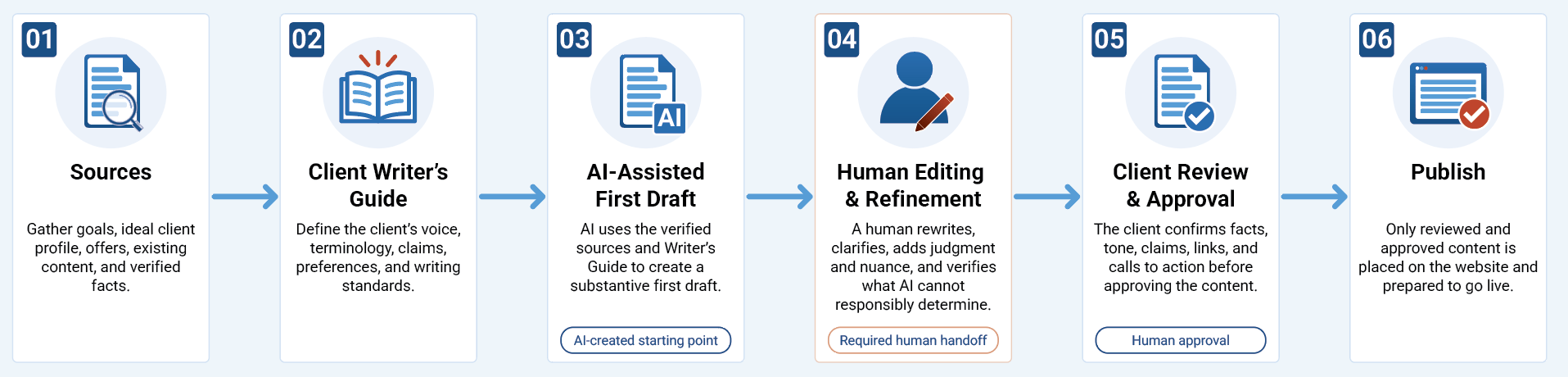
Looking back at my writing work, I can name nine recurring phases. They fall into three movements: before the draft (frame, ground, develop the idea, architect); working the draft (draft, evaluate, refine); and after the draft (produce and verify, learn). That is the deeper creative pattern, not a checklist a client needs to memorize. In client work, the same thinking takes a simpler, visible form: verified sources and a Client Writer's Guide direct an AI-assisted first draft; a person edits it; the client reviews and approves it; and only then is it published. The six-step graphic below shows those handoffs without erasing the work of finding the point, challenging the draft, or deciding what is ready to share.
The development process protects the working system
Website and software development followed a related pattern, but mistakes could damage something already working. AI had to understand the approved version, the files it could change, and what needed protection. Higher-risk decisions required a plan and my approval. A change was not done because the code ran locally; it had to work in the real website or HubSpot environment.
One development session made that distinction painfully clear. Decorative arrows between process icons would not align as the page changed width. Each code change looked like progress, but the visible result stayed wrong.
- The repeated problem: AI kept adjusting how the arrow images were positioned without solving the alignment.
- The reset: I stopped the edits and returned to a known baseline rather than stacking another patch on top.
- The new approach: I asked what assumption was failing, considered a different way to construct the arrows, and tested the result visually.
The useful move was not another instruction to “fix the alignment.” The problem was the approach, not just one setting within it. Changing that approach gave us a way to make progress against what I could actually see.
The development process has its own rhythm: understand and plan by loading the project's rules, clarifying the problem, and approving consequential changes; build in the right place while protecting what already works; then ship and learn by deploying, verifying, documenting the lesson, and reviewing the result myself. The point is not to make every task heavy; it is to keep a small fix from becoming a bigger mess. The same logic applies to a business website: strategy, approved content, and working pages need protection while AI helps you move faster.
Two processes, one responsibility
Both processes require me to set direction and inspect the result, but they protect different things. Writing protects point of view, facts, voice, and the reader's understanding. Development protects a working system and the visitor's experience. A polished sentence can betray the idea; valid code can still break the page.
Both processes also depend on correction. That is not evidence that AI is useless; it is part of productive collaboration. Microsoft's research on human–AI interaction identifies the ability to correct an AI system and understand its behavior as important design principles. My review shows the practical side of that idea: a correction should improve the current work, and a recurring correction should change the instructions, checklist, or process used next time.
Documentation takes time, and rules can become stale or contradictory. I do not need a procedure for every weak sentence or failed experiment. I do need guidance for recurring mistakes, costly changes, and decisions someone else will need to understand.
Start with the work, not the tool
Looking back over more than three years of AI use did not give me one universal prompt. It gave me a clearer picture of the work surrounding the prompt. I can use AI to explore an idea, create a draft, investigate a bug, or build part of a website. But I still have to decide what matters, provide the right context, recognize a bad assumption, and judge whether the outcome holds up outside the chat.
That is the practical lesson I would take into any business project. Before asking what AI can produce, ask what you are trying to accomplish, which information it can trust, what cannot be changed, and how you will know the result works. You can keep that process lightweight for a simple task and make it more deliberate when the stakes rise. If AI is already part of your marketing or website work but the results still feel inconsistent, where does your process need a clearer human decision?