
How Long Does It Take To Build a Website?
Posted in: Chief Marketing Officer · Website
Posted by: Corey Smith on May 27, 2026 at 08:02 am
Leading a web design and development team can come with all sorts of challenges. The most common challenges come from two key areas. First, the competencies required to build a website are the broadest of all in the digital marketing space. Second, most agencies don’t treat web design and development as a function of marketing.
So, how long does it take to build a website? For many small and medium business websites, a realistic timeline is about 8 to 14 weeks. A simple template-based site can be done faster. A complex website rebuild, HubSpot migration, ecommerce project, or custom build can easily move into the 16-week range or longer.
The timeline is not just about how fast someone can design pages or write code. It depends on how clearly the strategy is defined, how ready the content is, how many decisions are unresolved, how much technical complexity is involved, and how much testing needs to happen before launch.
Digital Marketing Skill Sets
There are certainly a broad set of skills required for digital marketing. Well, all marketing for that matter. Generally speaking, most digital marketing skills are siloed in their specialties. Some of the skills are cross-trainable, meaning that if you are good at one, you are likely capable of being good at another.
Here is a list of just a few of the digital marketing areas. The skills required for each can be very unique:
- Social media
- Paid social, which is a different skill than social media marketing
- Email marketing
- Search engine optimization (SEO)
- Paid search, including Google Ads
- Affiliate marketing
- Influencer marketing
- Web design and development
What makes it even more difficult is that direct-to-consumer marketing is very different from business-to-business marketing. Selling products online is not the same as creating qualified leads for a salesperson. The website has to support the business model, not just exist as a collection of pages.
Now, enter web design and development. I’ve written a more detailed post on what skills you need to build a website, but here’s a short summary of some of the top skills required:
- HTML and CSS
- JavaScript
- CMS templating languages such as PHP, TWIG, ASP.net, Liquid, and HubL
- Design software
- Wireframing and prototyping tools
- Hosting and server management
- Version control
- Security
On top of those skills, you also need to understand the basics of the other competencies. You need to know how your website will work with SEO, lead capture, paid ads, analytics, forms, CRM data, and follow-up workflows. You also need to understand how to configure platforms like Drupal, WordPress, HubSpot, Shopify, BigCommerce, and others.
Let’s not even get started on integrations.
It’s possible for one person to become a specialist in all the aspects of one competency like SEO or email marketing. But the breadth of skills in the design and development space requires so much more. And yet, we often treat website work as if it is the same kind of narrow specialty.
Web Design and Development Are a Function of Marketing
I built my first website in 1996. I poured my heart and soul into it and it was, how do you say it? So not good.
When I started Tribute Media in 2007, I was getting better. In the years since, through the agencies I’ve worked with, hired, worked for, and consulted with, I’ve found one thing that often separates the good development agencies from the bad. The good ones understand that the website build isn’t why they are in business. They are there for a much greater purpose.
A business does not really want a website. It wants to sell something, market something, teach something, support something, or make something easier for a real audience. The website is the platform that helps that happen.
In the world of web design and development, web design is a function of marketing.
Period.
It is a platform to market and sell a product or service. It creates a way to bring awareness and then guide people through their buyer’s journey to make a buying decision.
In every case over the last several decades that I have failed, or other agencies I’ve known have failed, it’s because we forgot the purpose of the website. The goal is not to complete pages. The goal is to create a useful marketing and sales asset.
How Long Does It Take To Build a Website?
Do you feel like I wasted your time on that preamble? I don’t think I did, because the timeline for a website project is directly connected to the challenges a web team has to solve.
If your web team is missing competencies, the project will take longer or the final product will be weaker. Likely both.
For most small and medium business websites, I would plan on 8 to 14 weeks from strategy to launch. That range assumes the team has the right skills, the content process is not a mess, and the decision-makers are available when decisions need to be made.
Here is a practical way to think about the timeline:
| Website project type | Typical timeline | Why it may take longer |
|---|---|---|
| Simple template-based website or small refresh | 3 to 6 weeks | Content delays, unclear messaging, or too many late design changes |
| Standard SMB website redesign | 8 to 12 weeks | Strategy work, page structure, content writing, approvals, and QA |
| Website rebuild with SEO planning | 10 to 16 weeks | URL mapping, redirects, content consolidation, internal links, and launch monitoring |
| HubSpot website or CMS migration | 10 to 16 weeks | Theme setup, module configuration, forms, CRM connections, tracking, and content migration |
| Large custom website, ecommerce site, or web app | 16+ weeks | Custom functionality, complex integrations, product data, user accounts, or unique workflows |
The most dangerous timeline is the one that sounds certain before anyone understands the work. A promised 12-week launch date can be reasonable. It can also be a sales line. The difference is whether the process behind the timeline is real.
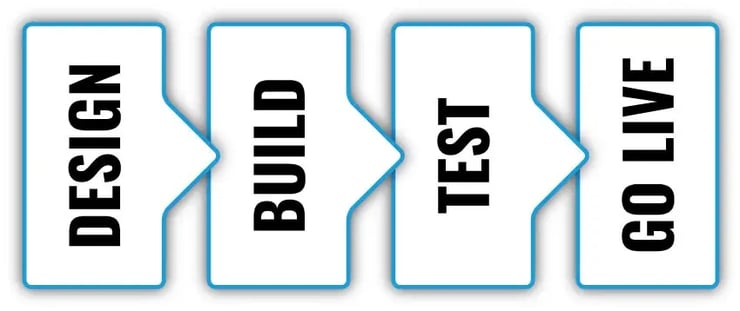
So, moving on, let’s explore the main phases of a web project.
Design Phase
The design phase is far more involved than just creating pretty pictures. This is where we think about the purpose of the website and create messaging that will cause site visitors to do what we want them to do. This is where we make sure we understand the requirements of the features and how they all fit together.
The most common reason this phase takes longer than it should is when clients or teams get stuck in analysis paralysis. I’ve seen companies large and small get so hung up here that they spend months wondering if a color should be chartreuse or teal. Yes, it has been that trivial. I’ve also seen people stall the process because they keep adding more features before deciding what the site actually needs to accomplish.
There are exceptions to every rule of thumb, but I typically think this process should take about four to six weeks from the initial strategy meeting to completion of the phase for most small and medium-sized business websites. It can be faster if the team is focused, but there is value in designing something and putting it on the shelf for a few days to make sure you are making the best decision with the data you have.
A legitimate reason this might take longer is a real business requirement for a custom app design, such as a product configurator or other custom functionality. We counsel clients to make sure there is a clear business need for that feature at launch before allowing it to hold up the entire site. Another legitimate reason is simply needing the right resources available for the design requirements.
At the end of this phase, all your assets should be gathered: content, images, product information, content offers, CRM requirements, hosting requirements, technical requirements, and launch expectations.
Build Phase
The build phase is what I like to call the “fingers on keyboards” phase of the project. At this point, the strategy is done. We know how everything fits together. Starting this phase before the assets are ready and before the design is complete is one of the most common reasons the build phase takes longer than it should.
This is not the time to be figuring out which technology to choose. It is not the time to wonder what graphical element is best. It is not the time to wonder if teal is better than chartreuse.
In my team, we have an ongoing debate on this next scenario. My opinion is that content should also be written for the site before this phase. Any decision that is not made before this phase will slow the project down. Sometimes it feels counterintuitive, but a proper strategy for how things will fit together will create a better product faster.
Generally, I feel most small to medium business websites should be in this phase for about four to six weeks. If the design phase is done right, this is where a good team can move quickly. We can get more talent to do more things faster because the important decisions have already been made.
There are certainly reasons this phase can be extended. If your website has 450 pages of content that need to be loaded, that will extend your time. If you have 250 products and decide each product page needs a unique touch, that will extend your time. If you have a custom application being created to fulfill a business objective, that will extend your time.
Under no circumstances, in my opinion, should this phase be stalled because an important strategic decision has not been made. If that happens, something was missed in the design phase.
Testing Phase
The most common problem in the testing phase is that not enough time is given. For most websites, if the build is done right, this step should take about one to two weeks. If there are advanced items like custom apps, user dashboards, custom checkout experiences, or unusual design elements, the time for testing should be longer.
While it is important to get a website live quickly enough to achieve business objectives, this is one phase where it can be good to slow down just a little bit. Testing on modern browsers should be a requirement to ensure desktop and mobile compatibility. Basic accessibility checks should also be part of the process. The W3C Web Accessibility Initiative has a helpful set of quick checks that can identify some common issues, though a full accessibility review is more comprehensive.
Your site may not be fully search engine optimized at launch. That is a whole other discussion. But it should have the basic hallmarks of a website that is ready for SEO work: page titles, meta descriptions, image alt text, crawlable pages, internal links, analytics, and clean redirects where old URLs have changed.
Don’t rush this phase, but also understand that nitpicking will not help you. Getting your website online is critical to making sure you achieve your goals.
Go Live Phase
It may seem simple to say, “Let’s take the site live.” The actual act of taking a new website live is usually pretty straightforward, but there are things about this process that can take a bit of time. If it is a new website, I usually plan about a day from the moment we get approval to the time we can go live. I like to plan in advance because I might want to do it on a Friday at the end of the day or early in the morning in the middle of the week.
But there are certain things we can’t properly test until after the site is live. While some testing can be done before launch, sometimes we need a live site to do a final verification. If the testing phase is done right, the errors should be minimal. But some things I like to make sure we test after the site is live include:
- Image alt text
- Page titles and meta descriptions
- Basic accessibility functions
- Forms, tracking, and CRM connections
- Broken links and redirects from old URLs to new URLs
If the project is a rebuild or migration, redirect planning should not be treated as a launch-day afterthought. Google’s guidance for site moves includes preparing a URL mapping, updating internal links, using permanent redirects where possible, and monitoring traffic after the move. That is exactly why website rebuild SEO planning belongs in the project timeline before launch day, not after it.
This phase starts with the website going live and ends when all the things we thought were checked out are actually working.
What Changes the Website Timeline?
The timeline changes when the work gets more complex, the decisions get slower, or the team tries to build before the strategy is ready.
A few of the biggest timeline factors are:
- Content readiness: If the content is not written, approved, and organized, the build will stall.
- Decision speed: A slow approval process can add weeks without improving the final product.
- Technical complexity: Custom functionality, integrations, ecommerce, gated content, and advanced forms all add time.
- SEO migration risk: A rebuild with important existing pages needs redirect mapping, internal link updates, and post-launch monitoring.
- Platform requirements: WordPress, HubSpot, Shopify, and custom frameworks each create different setup and maintenance needs.
- Stakeholder alignment: The more people who can veto a decision, the more important it is to define the decision process early.
AEO belongs in this planning conversation, too. If the site needs to answer buyer questions clearly, support AI search visibility, and connect related expertise across the site, that work should be considered before the build is finished. Clear headings, direct answer sections, FAQ planning, internal links, and schema or FAQ module setup are much easier to include during the project than to retrofit after launch.
This is why the questions you ask before the project matter so much. Before you commit to a timeline, read through the questions to ask before a web development project. They can save you from building a rushed site that solves the wrong problem.
How HubSpot Changes the Website Timeline
HubSpot can make a website easier to manage after launch, but it does not magically remove the strategy, content, design, and testing work required to build the site well.
A HubSpot website can move faster when the team uses a strong theme, clear modules, and a practical page-building system. It can also slow down if the project includes CRM cleanup, form strategy, workflow setup, tracking decisions, content migration, or custom module development.
That does not make HubSpot better or worse in every situation. It means the platform decision should match the business need. If you are comparing tools, the post on WordPress vs HubSpot for SMB websites can help frame the tradeoffs. If you already know HubSpot is the right direction, a structured theme like Sprocket Rocket can reduce some of the blank-page complexity that comes with custom website builds.
The key is not whether HubSpot can make the project faster. It can. The key is whether the team uses HubSpot in a way that supports the website strategy instead of just recreating the old site on a new platform.
What’s the Real Answer?
How long does it take? Well, that depends on a whole slew of things. If anyone says, “If you buy today, we guarantee we can have your site live 12 weeks from today,” they might be right. They also might be setting you up for disappointment.
Each phase above needs to happen in the right order. If you skip steps or let them happen out of order, things usually take longer, the product will not be as good as it should be, and you will not be as happy as you deserve.
I’ve built simple, template-based websites from strategy to live in less than four weeks with no worry of rushing. I’ve had more complicated sites take up to 16 weeks with no stalling on the client’s side or our team’s side.
If cost is the reason you are trying to force the timeline down, be careful. A rushed site can become expensive later if it creates SEO problems, weak messaging, technical debt, or a design system your team cannot maintain. That is part of why the question is a cheap website worth it? is not really about price. It is about what you are actually buying.
The real question you should be asking is this: what process will ensure that the website build is efficient, the timeline is reasonable, and the finished site supports the business?
If you are planning a website build or rebuild and need a realistic path from strategy to launch, start with the process. Smithworks can help you think through the strategy, scope, platform, and launch plan behind a better business website through website development.
Frequently Asked Questions About Website Timelines
Website timelines create a lot of reasonable questions because the answer depends on more than page count. The questions below clarify what usually affects the schedule, where projects slow down, and how to plan a website build without forcing a timeline that works against the business goal.
How long should I plan for a small or medium business website project?
For many small and medium business websites, plan on roughly 8 to 14 weeks from strategy through launch. A focused template-based site may take 3 to 6 weeks, while a rebuild with SEO migration work, custom features, ecommerce, or complex integrations can take 16 weeks or longer. Those are planning ranges, not promises: content readiness, stakeholder approvals, page count, migration risk, and testing can move the schedule quickly. Ask for a timeline tied to clear phases and assumptions before you treat any launch date as firm.
Related Posts: What Skills Do You Need to Build a Website? · 6 Questions to Ask Before Any Web Development Project · Is A Cheap Website Worth It?
What commonly slows down a website project, and how can you prevent delays?
Website projects usually slow down when decisions, content, scope, or technical requirements remain unsettled. You can reduce the most common delays by planning for them early:
- Name one decision-maker and set approval deadlines.
- Set content deadlines before development depends on the copy.
- Control scope changes and document anything deferred to a later phase.
- Identify integrations and SEO migration needs before development begins.
- Protect a realistic quality-assurance window before launch.
A clear plan will not remove every surprise, but it keeps small questions from turning into schedule problems.
Related Posts: 6 Questions to Ask Before Any Web Development Project · What Skills Do You Need to Build a Website? · Rebuilding Your Website with SEO in Mind
Can a website realistically be built in four weeks?
Yes, a small template-based website can be built in four weeks when the strategy, page list, content, design direction, platform, and decision-makers are ready before the build begins. That schedule usually excludes a large content migration, custom application work, complex integrations, ecommerce, and a long approval chain. The practical test is not whether four weeks sounds possible. It is whether the scope and inputs are ready enough to protect strategy, accessibility, SEO, testing, and launch quality.
Related Posts: Is A Cheap Website Worth It? · 6 Questions to Ask Before Any Web Development Project
How long should I plan for a HubSpot website build or migration?
A HubSpot website build or CMS migration often needs about 10 to 16 weeks when the scope includes strategy, design, theme and module setup, content migration, forms, tracking, testing, and launch planning. A smaller implementation can move faster when content and decisions are ready, while custom modules, CRM cleanup, workflows, integrations, redirect mapping, or a large migration can extend the schedule. Treat the range as an early planning estimate, not a fixed promise. Your project timeline should name what is included, who approves each phase, and what must be ready before development starts.
Related Posts: WordPress vs HubSpot: What's Best for your website? · Sprocket Rocket: The Gold Standard in HubSpot Theming · Elements of an Inbound Marketing Campaign
What should be decided before website development starts?
You do not need every detail frozen before development starts, but the decisions that shape the build should be approved. Confirm these basics first:
- The business goal, sitemap, and purpose of each page.
- The design direction and content plan.
- The platform, technical requirements, integrations, and SEO migration needs.
- Who approves the work and how changes will be handled.
Draft copy, imagery, and smaller presentation details can continue to improve during development when the schedule allows. Set deadlines for those items so unfinished content does not change the structure or delay the build.
Related Posts: 6 Questions to Ask Before Any Web Development Project · What Skills Do You Need to Build a Website? · Rebuilding Your Website with SEO in Mind
Does planning content for search and answer engines add time to a website build?
It can, and the amount depends mostly on how much content your site needs and how much research is already complete. Planning may include researching real customer questions, writing concise answers, organizing pages around those needs, and creating useful internal links. Accurate structured data may also be added where the page and content qualify, but there is no special schema that automatically makes a page ready for answer engines. Doing this work during the build is usually more efficient than reorganizing the site after launch.
Related Posts: AEO 101: A Beginner's Guide to the Critical Steps · Rebuilding Your Website with SEO in Mind · What Skills Do You Need to Build a Website?
Editor's note: This article was updated on May 27, 2026 to clarify website timeline ranges, add project-type guidance, include HubSpot-specific context, and improve SEO and AEO structure.

About Corey Smith
Ready to simplify and succeed? Let’s make it happen—because your business deserves practical, no-nonsense wins. Find me on LinkedIn.